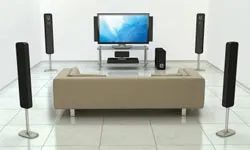
It’s easy to write off smart home gadgets as fleeting trends. They aren’t. Like any electronics, they evolve, improve, and drop in price. The core promise remains the same. These systems use computers and sensors to automate tasks. They want one thing: to make your life less cluttered and less stressful.
Some devices are practical. They turn on lights when you walk into a room. Others start the oven before you leave the office. Then there are the fun ones. The 3-D TV falls here. It’s about entertainment. It’s about novelty. But beneath the flash, there is a serious shift in how we live.
The Reality of 3-D TV
Let’s look at the 3-D TV. It’s on this list not because it’s essential, but because it represents a specific type of home tech innovation. We buy these things to make life more fun. That’s the goal.
But for the DIY homeowner, it’s worth asking why this matters. Is it just about watching movies in immersive depth? Or is it a lesson in integration?
Home tech products use computers and other futuristic gadgets to perform a variety of automated tasks that are generally centered around one goal: to make your life simpler.
How It Fits Into Your Home
You don’t need a 3-D TV to have a smart home. But you do need to understand the ecosystem. The 3-D TV is a display technology. It requires a source. It requires glasses. It requires space.
Think about the renovation process. You’re planning your media wall. You’re running cables. You’re thinking about sightlines. A 3-D TV changes the equation. It demands more than just a flat surface. It demands attention to lighting. Glare kills 3-D immersion.
If you’re DIY-ing your living room, consider the practicalities.
- Lighting control: You need dimmable lights or blackout shades.
- Seating: Viewers need to sit in specific zones.
- Source content: You need Blu-ray discs or compatible streaming apps.
It’s not just a purchase. It’s a setup. It’s a commitment to a specific viewing experience.
Why This Matters for Your Renovation
Most home tech innovations center around simplicity. The 3-D TV seems counterintuitive. It adds complexity. You need to put on glasses. You need to adjust your position.
But look closer. It’s about immersion. It’s about creating a dedicated space for enjoyment. In a renovation, that matters. You’re designing rooms for purposes. A home theater isn’t just a TV stand. It’s an environment.
The lesson here is subtle. Smart home tech isn’t just about automation. It’s about curation. It’s about choosing what enhances your life and what just sits there.
The 3-D TV might not be for everyone. But the principle remains. Technology should serve you. Not the other way around.
Next up, we’ll look at the next item on the list. And it might surprise you. It’s less about glasses and more about safety.


The Depth Charge: Why 3-D TV Is Still a Hard Sell
Remember that feeling when Avatar hit theaters? The world held its breath. We expected the future of living rooms to look exactly like the screens we saw on them. Fast forward a few years, and the reality is… different. Sony and Samsung pushed hard on 3-D TVs. They wanted Hollywood’s magic in your parlor. But is it worth the plug-in cost?
Here is the raw physics of it. Standard TV? Flat. Height and width. Simple. HDTV? Still flat, just sharper. 3-D adds depth. It tricks your brain into seeing volume. To pull that off, the screen shoots two images at once. Your left eye gets the left angle. Your right eye gets the right angle. Your brain merges them. Illusion complete.
But you can’t just stare at the screen. You need gear. Specifically, active liquid crystal shutter glasses. These aren’t the cheap red-blue paper glasses from the 1950s. They are electronic. They blink in sync with the TV, blocking each eye alternately. Without them? You get double vision. A headache. A waste of money.
Who broadcasts this stuff? ESPN tried. Some networks dabbled. But the library of content never really exploded. You don’t want to spend $3,000 or more on a set if there is nothing new to watch in the format. The tech works. The spectacle is real. But the ecosystem? It stalled.
Hydrofloor: Turn Your Pool Into a Patio
Look at your backyard. Is it a swimming hole? Is it just concrete? If your pool is eating up all your usable square footage, you are not alone. Most homeowners hate having a giant blue hole in their garden for six months of the year. Enter the Hydrofloor.
This isn’t a fancy cover. It is a structural floor that rises from the bottom. You hit a button. The platform ascends. It stops at whatever depth you set. Once it hits the top, it is flush with your patio. It is safe. You can walk on it. You can dance on it. You can play bocce ball on it. No wet feet. No diving board required.
The utility goes beyond party space. A pool loses heat to evaporation. Constantly. Covering it with a solid, insulated Hydrofloor drastically cuts energy costs. It keeps the water warm when the seasons change. It saves money on heating bills. It saves space. The installation price varies based on the size of your pool and the materials used. But for a homeowner who wants a versatile outdoor room rather than just a bathtub, it is a smart architectural move.
Smart Glass: Privacy Without the Blinds
How many times have you closed the blinds just to keep the neighbors from seeing you eat cereal in your underwear? We live in a world of drawn curtains. It is safe. It is private. It is also ugly. It blocks natural light. It makes rooms feel smaller.
Smart glass, or switchable glass, kills the need for window treatments. The technology is already here. You don’t need to wait for it. The glass contains special materials. When you run an electrical charge through it, the molecules align. The window goes from clear to translucent. Or opaque. Depending on the brand, it happens in seconds. Or minutes.
You control it manually. Or you hook it up to a sensor. The sensor regulates light. It keeps the sun out when it’s too hot. It keeps the prying eyes out when you are home. Some versions even let you project images on the glass. Sync it with music. Turn your window into a screen.
“Your neighbor can’t see inside. The light is still there.”
This is not just about vanity. It is about energy efficiency. By controlling the light transmission, you reduce the load on your air conditioning. You save money. You keep your view. And you never have to clean dust off a curtain rod again. The days of the heavy drape are over.
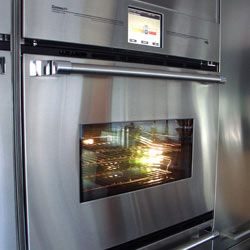

The Fridge-Oven Hybrid That Defies Logic
We are past the point of sensible appliance design. Enter the Connect IO from TMIO, a wall oven that apparently forgot which side of the kitchen it belongs to. It cooks. It also refrigerates. Is it a fridge that heats up? Or an oven with a cold shelf? The marketing is vague, but the functionality is terrifyingly specific.
Here is the workflow, assuming you have the budget for it.
Toss a raw dinner entrée into the unit before you leave for work. The machine keeps the food cold all day. No thawing. No prep. Just cold, uncooked ingredients sitting in a high-tech box.
Then comes the magic. Just before you clock out, you tap a button on your phone or computer. The device heats up. It cooks the meal from a cold start. You walk through the door, and dinner is ready.
There is a catch, of course. You have to serve yourself. The machine does not plate your food. It does not know you are hungry. It just follows instructions.
The price tag? Around $5,800.
For that money, you get a dual-purpose nightmare that solves a problem no one really has while creating a new one: where do you put an oven that needs to be cold?
6. Apple TV
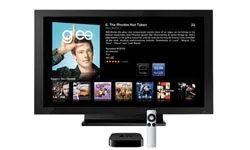
The price point alone is hard to ignore. $99. It’s a cheap entry into a walled garden that suddenly has a door opening onto your living room wall. The new Apple TV box is tiny. Smaller than the previous generation. You plug one HDMI cable into your HDTV and you’re done with the wiring. Connect to Wi-Fi. That’s it.
Then the content hits you. Over 7,000 movies. Half of them in HD. Each rental runs you $4.99. It’s not free. But for some, the convenience beats the library. HDTV episodes cost just 99 cents. You get ABC Family, Fox, Disney Channel, and BBC America. The catalog is specific. If you watch those networks, you’re set.
“The new, much smaller box is just $99 and hooks to any HDTV with a single HDMI cable connection.”
Beyond the Rented Movies
Streaming isn’t just about buying movies on demand. You can pull content from the web directly. Netflix. YouTube. Flickr. Or your own computer. It acts as a bridge. Your computer becomes the source. The TV becomes the display. No extra software required on the screen itself. Just the HDMI handshake.
And because it talks to iTunes, your digital life spills over. You aren’t limited to what Apple sells. You stream your own music. You access over 200,000 podcasts. There are 4,000 Internet radio stations. You can pump all of that through your home entertainment system. It turns a passive TV into an active media hub.
5. Starry Night Bed
Switching gears entirely. If you’re tired of streaming content and want to sleep under it, look up. Literally. The Starry Night Bed isn’t for streaming. It’s for dreaming. Or at least, pretending you are.
This isn’t a standard IKEA find. It’s a niche product often found in specialty children’s furniture stores or high-end boutique catalogs. The goal is simple. Replicate the night sky inside your bedroom.
How does it work? Usually, it involves fiber optics or LED strips embedded in the headboard or the ceiling canopy above the bed. The “starry” effect is achieved by dimming the room lights and activating the embedded lights. They twinkle. They don’t flicker like a broken neon sign. They mimic stars.
Materials matter here. Most units use high-quality ABS plastic for the frame to keep weight down. The light sources are typically cool-white LEDs to mimic moonlight or starlight without overheating the room. Safety is the primary concern, especially if this is for a child. The wiring is usually low-voltage. Look for UL or CE certification. Don’t rig something up with exposed 110V wires. That’s not a dream. That’s a fire hazard.
“It mimics stars. They don’t flicker like a broken neon sign.”
Why would you buy this? For the aesthetic. For the sense of calm. It’s a sensory experience. The darkness becomes textured. The ceiling becomes a canvas. It’s less about functionality and more about atmosphere.
If you’re DIY-ing this, you’ll need an LED controller, a power supply, and a diffuser.
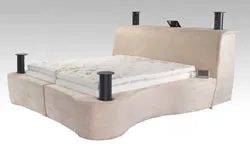
The Starry Night Bed
You might assume a bed is just a place to sleep. The Starry Night Bed by Leggett and Platt proves otherwise. It connects to other devices in your bedroom or whole house. You can program it to control lights, thermostat, security, and media. Create a reading mode. It raises the head, turns on bedside lamps, kills the TV, and dims ceiling lights. Try relaxation mode. It activates massage, lowers lighting and temperature, and plays unwind music. The only downside? Getting up must be difficult.
Google TV
Google is changing how we watch TV. Google TV merges web information with high-definition viewing. Search the internet. Watch shows, clips, sports, and movies in HD. View photos. Play games. Check scores. Move between web and TV seamlessly. You do not need a new 3-D TV. Buy a device for around $300. Some sets have it pre-installed.
Digital Lighting
Feel blue? Switch to yellow. Green around the gills? Try fuchsia. Digital lighting lets you change your house’s color with a remote. The core tech is the LED bulb. Pick color and brightness. LEDs save energy. They use less power than regular bulbs. Some companies make microprocessors controlling LED systems. They generate over 16.7 million colors.
PlayStation Move
Kids wanted the Nintendo Wii. Now they want the PlayStation Move. Sony’s interactive 3D system for PlayStation 3 uses a wireless wand. The basic package costs $99.99. It includes one controller and a sports game. Add a controller for $29.95. The New York Times praises its sophistication and ease. Unlike the Wii, Move does not use batteries. You need a recharger. It costs about $30.
Steam Washer
Wait for it.
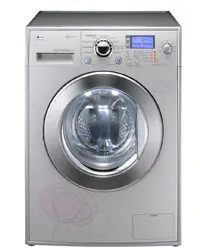

Raise your hand if laundry is the weekly nightmare. You’re not alone. Is that grass stain on the kid’s soccer jersey ever actually going to vanish? And the wrinkles? Forget about it. Manufacturers like LG, Kenmore, and Whirlpool have responded. They added steam cycles to washers and dryers. LG even built machines that target allergens. Dust mites? Gone. Pet dander? Banished.
So what is the deal with steam? It’s not just a gimmick. Steam boosts cleaning power. It sanitizes fabrics. It removes dirt and grime better than standard water washing. The science is simple. Steam molecules move faster than water molecules. They are hotter. They slip between fibers. This action rids clothes of dirt and odors that regular cycles miss.
How Steam Dryers Fight Wrinkles and Odors
Steam dryers don’t just dry. They apply steam at specific times during the cycle. The result? Smoothed wrinkles. Softer clothes. But the real benefit? Odor removal. Does your husband’s shirt smell like tobacco smoke? Or something equally unsavory? A quick steam cycle kills the stench. You don’t need to rewash. You don’t need harsh chemicals. Just steam.
Is Steam Worth the Upgrade?
If you’re tired of scrubbing, steam is your answer. It works. It’s effective. It saves time. What else can you do to improve laundry results? Stick to the steam cycle. Watch the wrinkles disappear. Smell the difference. It’s a small change. A big payoff.